UDISE Plus Teacher Module: UDISE+Teacher Module
If you are not sure what UDISE Plus is, here is a simple explanation. UDISE Plus is an online platform that collects and manages important education data for schools and colleges. It brings different information together in one place.
The system includes several modules such as the UDISE Plus Teacher Module, Student Module, Data Entry Module, and other tools. The main goal of UDISE+ SDMS is to make education management easier by organizing details related to teachers, students, and school infrastructure in an efficient way.
What is the UDISE Plus Teacher Module?
The UDISE+ Teacher Module is a special system used by authorized school staff to manage teacher information. Through this platform, administrators can add new teacher records, update existing details, and verify important information. It stores key details such as joining date, qualifications, training records, service history, and any changes in a teacher’s status. The module helps schools keep all teacher profiles accurate and updated. It can also manage information related to non-teaching staff, making it easier to handle staff records safely in one place.
Login to the UDISE Plus Teacher Module through official website. We will explains all the login process of Teacher Module.
How to Login the UDISE Plus Teacher Module?
It is very simple to access UDISE + Teacher Module for 2026. Follow these steps:
Go to official UDISE+ website open the Teacher Module Login–https://udiseplus.gov.in/udiseteacher.
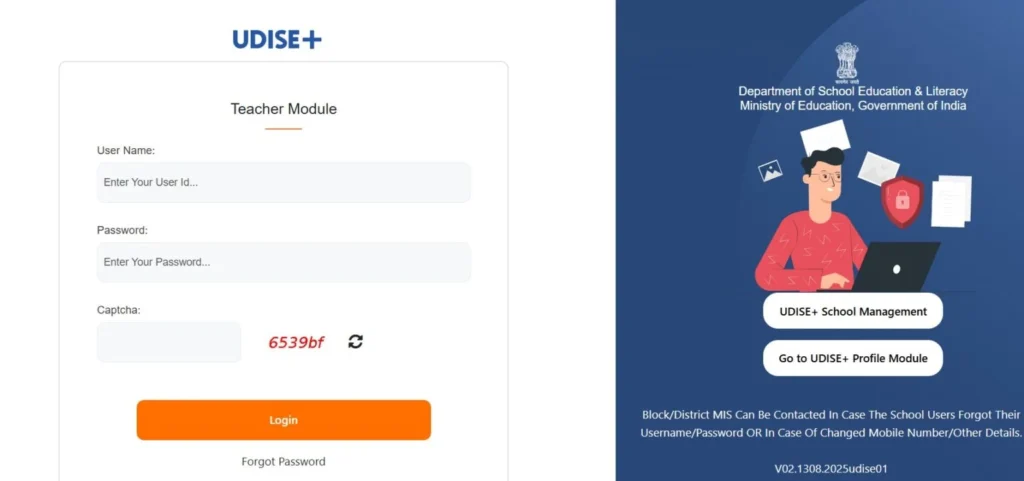
- Enter your User id 11-digit UDISE code.
- Add your password provide by the Block or District Mis Team.
- If you login first time change your password.
- After entering your credentials, fill the captcha and verify.
- Click on “Login” the UDISE Plus dashboard will appear.
- Click on Teacher Module section.
- You can add, update and teacher profile and status information.
How to Set Up Your UDISE Plus Teacher Profile for the First Time?
- After logging in with the password provided by the Block or District MIS, change your password.
- You can update you password under Profile > Security.
- Verify the school details. If any information is incorrect.
- Create a team checklist and assign clear roles, such as UDISE data entry, data verification, and final submission.
What do you need to log in?
Requirements for logging into UDISE+ Modules.
- Username: School give you 11-digit UDISE code the User ID, provided by the state. You can get it your Block or District MIS office.
- Password: Your team will provide the password, but for security reasons you must change it when you log in for the first time.
- Browser & Contact: Use a trusted web browser such as Chrome, Edge, or Firefox, and make sure your mobile number is active so you can receive OTP verification codes.
Adding Teaching Staff Details
Use the UDISE Plus Teacher Module, follow these steps to add a new teacher:
- Click on “Add Teaching Staff” option.
- Fill in the teacher’s personal details, including name, gender, date of birth, Aadhaar number, staff code, social category, academic/professional qualifications, mobile number, and email. The ID Card number is mandatory for new entries.
- Enter the teacher’s main subject, indicate whether the appointment is regular or on contract, and provide the joining date.
- Enter appointment details, such as the class they will teach and their primary subject.
- Enter the training details, including programs such as special needs education, cyber safety, or NISHTHA training.
- Enter all the details, click “Save & Next”.
Adding Non-Teaching Staff
In UDISE Plus portal, you can add non-teaching staff by following these steps:
- Click on “Add Non-Teaching Staff” and add details, including name, gender, Aadhaar number, and other required information.
- Choose the staff member’s designation from the drop-down list.
- Click “Update” to save information.
Adding VTP Staff
- Click on “Add VTP Staff” option.
- Enter the staff member’s details in the same way as other staff entries, including name, qualifications, and appointed sector (e.g., Agriculture or IT).
- Provide their training status and the class they will teach.
- Click on “Save”.
FAQ
What is the UDISE Plus Teacher Module?
The UDISE Plus Teacher Module is an online system that helps authorized school staff manage teacher information easily. Through this platform, schools can add new teacher records, update existing details, and verify information. It also allows schools to track important data such as teachers’ qualifications, service history, training details, and appointment status in one place.
Who can access the UDISE Plus Teacher Module?
Only authorized school staff, such as the Head of School or assigned personnel, are allowed to log in and manage teacher information. They can access the system using the school’s 11-digit UDISE code along with a secure password provided by the Block or District MIS office.
What tasks can be performed in the Teacher Module?
Users can add details of new teaching and non-teaching staff, update existing teacher profiles, monitor training and appointment records, manage subject allocations, and keep teacher information accurate for efficient school administration.